
A pattern you like may use a bead brand you do not own. Change its palette to find approximate colors in your brand, then replace individual colors when you have a preferred substitute. Check the face and other important details before you settle on the new version.
Start with a pattern you like
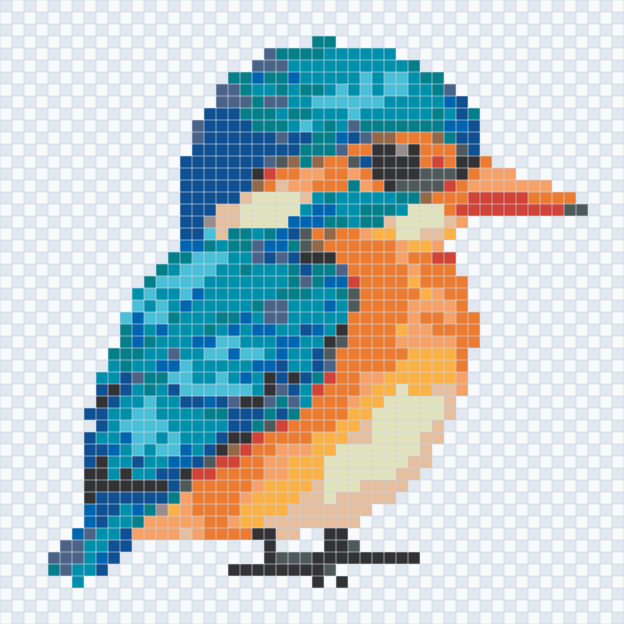
You can start from your own local pattern or a design in the pattern library. This page uses the original bird from our reducing-colors guide: 52 × 52 cells, 1,119 beads and 16 Perler colors. Its shape and empty positions stay fixed when the palette changes. A different brand may merge shades, changing how details read.
Try the same chart in another palette
Try a target brand below. Every brand selection starts from the original Perler chart. The materials list shows the target codes and counts. Select a used color to highlight its cells, choose a substitute in that same target palette, and apply it to every matching cell. Use Reset to start again. This example runs locally and does not save or replace your editing draft. Here, Hama uses 14 colors and MARD uses 15; both keep 1,119 beads. Merged and approximate counts describe the brand-mapping step; subsequent replacements update the current color count and list.
Materials list
Make your own library copy
Open a pattern in the library and choose Edit a copy. In the workspace, open Change palette, choose the brand you use, and compare Before and After. The summary tells you how many colors merged and how many matches are approximate. Apply when you prefer the result, or cancel. Editing a copy keeps the public source intact. Saving or publishing your own version follows the normal account flow; opening the copy does not publish it. If you have a local draft already, read the replacement prompt before continuing.
Find a pattern in the library →Replace a color you do not have
After switching brands, compare the listed codes with the beads you actually have. Choose Replace for a used color and select your substitute. The change affects every bead using that color, including separate areas such as eyes and outlines. Check all highlighted areas before replacing. You can undo the applied edit. This helps you use a color you own, but the tool does not track your inventory or automatically restrict matching to your bead collection.
Inspect, then prepare your materials
Inspect both the whole subject and small details. Two similar shades may map to one target color, so an eye edge or shadow can lose contrast even though no cells moved. White is a bead color; empty cells remain empty. After all replacements, check the updated brand, color codes and quantities before exporting. Palette matching uses digital reference colors: physical batches, lighting and finishes may differ. A palette change does not establish bead-size or pegboard compatibility. Use your actual materials to check those separately.
Continue reading: Read a pattern and its materials list · Reduce colors and inspect details